


Author: Alex Petrov
For decades, Autodesk AutoCAD has been the undisputed industry standard in computer-aided design (CAD), shaping the workflows of architects, engineers, and designers worldwide. However, the high cost of licensing and the increasing availability of powerful, cost-effective alternatives are prompting many organizations to re-evaluate their CAD software strategy. Among the leading contenders, NanoCAD has emerged as a compelling choice, offering a familiar environment, robust functionality, and a significantly lower total cost of ownership.
This article provides a comprehensive, expert-level guide for professionals and organizations considering a transition from AutoCAD to NanoCAD. We will explore the key drivers for this migration, conduct a detailed comparative analysis of the two platforms, and present a practical, phased roadmap for a successful transition.
The Case for Change: Economic and Technical Drivers
The decision to switch from a long-established tool like AutoCAD requires a careful evaluation of potential benefits versus disruption risks. The primary motivations are usually a combination of immediate economic relief and long-term technical flexibility.
Cost-Benefit Analysis: Moving Beyond Subscription Fatigue
The most significant advantage of switching to NanoCAD is the substantial reduction in licensing costs. AutoCAD’s mandatory subscription model represents a significant ongoing financial commitment. NanoCAD contrasts this by offering flexible subscription and perpetual licensing models suitable for different budget structures.
| Feature | AutoCAD | NanoCAD |
| Licensing Model | Subscription-based | Subscription & Perpetual |
| Annual Cost | ~$2,030 – $2,095 USD per user | ~$289 USD (Platform) – $1,137 USD (Max) |
| Free Version | Limited (Student/Trial) | Yes (NanoCAD 5, non-commercial use) |
As illustrated, annual savings can exceed 80% per user. This allows organizations to reallocate capital to hardware upgrades, training, or expanding design teams.
The Critical Requirement: Native DWG Support
Any CAD migration strategy must prioritize data integrity. The DWG format is the de facto standard for CAD data exchange. NanoCAD addresses this by providing native support for the DWG format, allowing users to open, edit, and save existing AutoCAD files directly without conversion. This seamless interoperability is foundational to a risk-averse migration strategy.
Feature Deep Dive: A Head-to-Head Comparison
A successful migration hinges on understanding the functional nuances between the platforms. NanoCAD is specifically designed to minimize friction for experienced AutoCAD users.
User Interface and Learning Curve
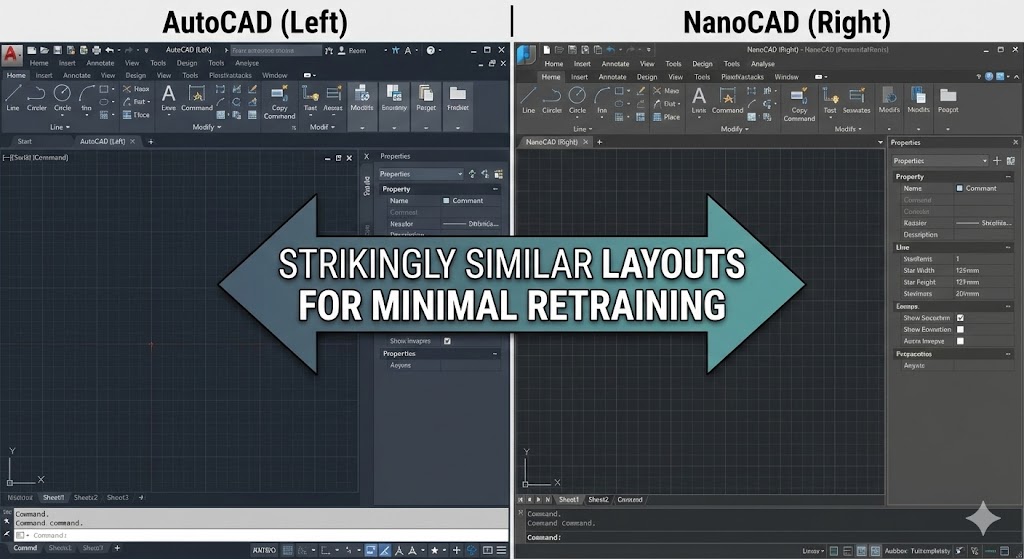
The transition to NanoCAD is remarkably smooth due to intentional design choices. As stated by NanoCAD resources:
“nanoCAD’s operating principles are designed to look and feel just like other well-known CAD systems. This means that any experienced designer can master nanoCAD instantly. Drawing spaces, command lines, positions of menu items, and icons are recognizable, so there is nearly no need for retraining.”
Key UI similarities include:
- Ribbon and Classic Interfaces: Both platforms offer modern ribbon and classic toolbar layouts.
- Command Line: The command line, a staple of professional CAD workflows, supports the same commands and aliases users are accustomed to.
- Customization: Extensive options allow organizations to replicate their existing AutoCAD environment within NanoCAD.
Core 2D Drafting Capabilities
For the majority of CAD users whose work is primarily 2D drafting, NanoCAD offers comprehensive feature parity with AutoCAD. Standard drawing, editing, annotation, and layer management tools are nearly identical in function and workflow. While AutoCAD’s Dynamic Blocks offer higher parametric control, NanoCAD’s standard block functionality is sufficient for most applications.
3D Modeling and Advanced Capabilities
While AutoCAD provides a fully integrated 3D modeling environment, NanoCAD utilizes a modular approach. Its optional “3D Solid Modeling” module offers both parametric and direct modeling capabilities. This module also includes advanced features such as 3D constraints for assemblies, sheet metal design tools, and support for importing and exporting various 3D file formats like STEP and IGES.
API and Customization
A critical factor for advanced users is API support. Like AutoCAD, NanoCAD provides a robust open API supporting .NET, C++, and LISP. This enables the migration of existing customizations and LISP routines from AutoCAD to NanoCAD with minimal effort, preserving valuable intellectual property.
The Migration Roadmap: A Phased Approach
A successful migration is a strategic process requiring careful planning.
Phase 1: Assessment and Planning
Define goals and conduct a thorough audit of existing workflows, customizations, and critical third-party applications. Catalog DWG files and select a pilot team with varying skill levels.
Phase 2: Pilot Program and Testing
Install NanoCAD for the pilot team, configuring it to mirror the existing AutoCAD environment. Test performance and stability using real-world project data and establish a formal feedback loop.
Phase 3: Customization and Configuration
Based on pilot feedback, configure NanoCAD for full deployment. This involves transferring custom interface settings using tools like UIEXPORT and UIIMPORT, migrating LISP routines, and standardizing templates and block libraries.
Phase 4: Training and Rollout
Provide targeted training focusing on key differences. Execute a phased rollout by department to manage any issues effectively, and establish ongoing post-migration support.
Conclusion
Transitioning from AutoCAD to NanoCAD is a strategic decision delivering significant benefits in cost savings, flexibility, and user experience. With its familiar interface, robust feature set, and native DWG support, NanoCAD presents a compelling alternative. By following a well-planned and phased migration approach, organizations can ensure a seamless transition, empowering their design teams with a powerful and affordable CAD platform for the future.